Friday, January 3, 2014

preparing for the worst, knowing the best is yet to come!

Today I am an OCD planner. No, I am not preparing for a zombie attack or the end of the world second anniversary... it is something much larger and needing much more preparation. I am preparing for weddings!

In the past couple of years it feels as though I cannot check Facebook without another wonderful announcement of an engagement. I just am addicted to seeing the excitement and love surrounding these announcements and events. However, I know that some people think of weddings as huge balls of stress. As long as you keep the focus on the couple, let their love shine, and you have a well prepared bridesmaid, nothing can go wrong!

I have been lucky enough to have been chosen by two of my very best friends to be a bridesmaid in their weddings. Even though the day has come and gone I still feel honored that I was able to stand next to them on one of the biggest days of their lives. Aren't they just stunning!?!


One gift I was able to give to my brides was to be prepared in case of any emergency. I wanted nothing to go wrong on my watch! I scoured the Internet, thought about my own experience, and wandered the aisles of grocery stores until I knew I had everything an emergency kit could need. Since being in these weddings I have been asked by other friends who are preparing for their own wedding or a friend's wedding as to what exactly my Mary Poppins emergency bag included. So, with the holiday engagement season and wedding season approaching I thought I would spill the bag details to those out in the social media world preparing for their own zombie attack wedding. 


Here is the bag and its contents all in one shot. I purchased a tote that was large enough to hold all of these items. You can find cute totes in make-up sections at larger stores, however you tend to get a better deal looking in the purse/ bag section. I tried to organize the items into zip lock bags to make it easier to find things when digging in the larger tote. I also kept a few extra zip lock bags in the tote. Three things that are not pictured are water bottles, candy and snacks (granola bars, apples, trail mix, and other snack foods). Things that you should note that are in this larger overview and are not documented below are: nylons, socks, straws, pens, sharpie markers, scissors, nail clippers, cash, my cell phone, and feminine hygiene products. Other good items to include are paper, note cards (for the speech), gas-x, tums, earring backs, matches/ lighter, vendor list and phone numbers, crochet hook for wedding dresses with button backs, and a picture of the groom. I also had my hair dryer, straightener, and make-up on hand that are not pictured. I carried the Kleenex and the bride's lip gloss on me throughout the event. As well as the cash mentioned above.

Mouthwash, hand sanitizer, body spray, static guard, baby powder, deodorant, clear nail polish, polish remover, shaving gel. You can also include nail polish that matches the color the bridesmaids will be wearing to help with day of chips.

Band-aids (regular and blister), Pepto, Visine, Neosporin, Cortizone 10, allergy medicine, pain reliver, and migraine medicine. I also had a small first aid kit that included sting wipes and other items to help with cuts. This was also where I had tums, gas-x, those kinds of things mentioned above.

Combs, hair brush, bobby pins, tweezers, chapstick, make-up remover wipes, facial cleansing wipes, hair keepers, razors, nail files, toothbrush and paste, and floss. You can also buy those clear plastic hair keepers.
Sunscreen (both for the face and spray for the body), bug repellent spray, burn relief spray, and aloe. Basically my emergency section thank you fair skin and red hair...

Emergen-C (or Airborne), gum, mints, cough drops, and throat lozenges.

Lint roller, sewing kit, duck tape, Krazy glue, tide to go pen, scotch tape, and safety pins. White chalk should also be included as that works stain wonders! You cannot see my lip gloss spill on my wedding dress in any of my pictures thanks to that chalk, phew!

Kleenex, cotton balls, and cotton swabs


I hope that this list is helpful for those blushing brides-to-be and their beautiful bridesmaids. I hope that you are prepared for the worst, but I truly hope that none of these items are needed on the big day. My mom was cute for my wedding and created a bag for the boys as well as baskets for the guest bathrooms. Apparently I get my planning side from my mother.

Oh, and if you have something that you have included in your emergency bags that I have overlooked, please share in the comments!

Enjoy that big day and eat an extra slice of cake for me!


Sunday, October 6, 2013

Some call it "nesting"...

Today I am preggers. Well, I guess I have been preggers for 35 weeks now, but who is counting? I like this crazy feeling of baby bouncing around in the belly and I am not really ready to let that go, but I am BEYOND ready to find out if we are having a little girl or boy. Not knowing has created some challenges (which are heavily out weighted by how happy it makes my wonderful husband). The first was simply what color scheme do we do for the baby room. It seems as if you are not doing pink or blue you get two other choices: crazy land of too many colors or jungle. We opted for something a little more modern and a little more us....

She is 100% positive the room was created for her...

Dresser  from Ikea. Andrew repainted it to match the room better.

The books are filled with the most amazing thoughts from people that have loved Andrew and I for years. It makes me tear up with happiness.


I made the curtains (thanks to Kelly at View Along the Way), the pillows, and the crib bedding (thanks to my amazingly talented mom this summer!).
Chair and crib from Ikea... see a theme yet? We are a little bit obsessed with Ikea. (Total side note: that is the chair Andrew gave me as a birthday present as the distraction for my engagement ring which came right as I sat down on that chair for the first time).
Andrew my amazing painter not only matched the paint colors perfectly; he then proceeded to paint the whole room better than I originally imagined.
While searching for my perfect teal fabrics I found this gray print with the alphabet. It was too cute to pass up and turn into a large pillow. The cute lamb was a baby shower gift. The best part? It says the Lord's Prayer.
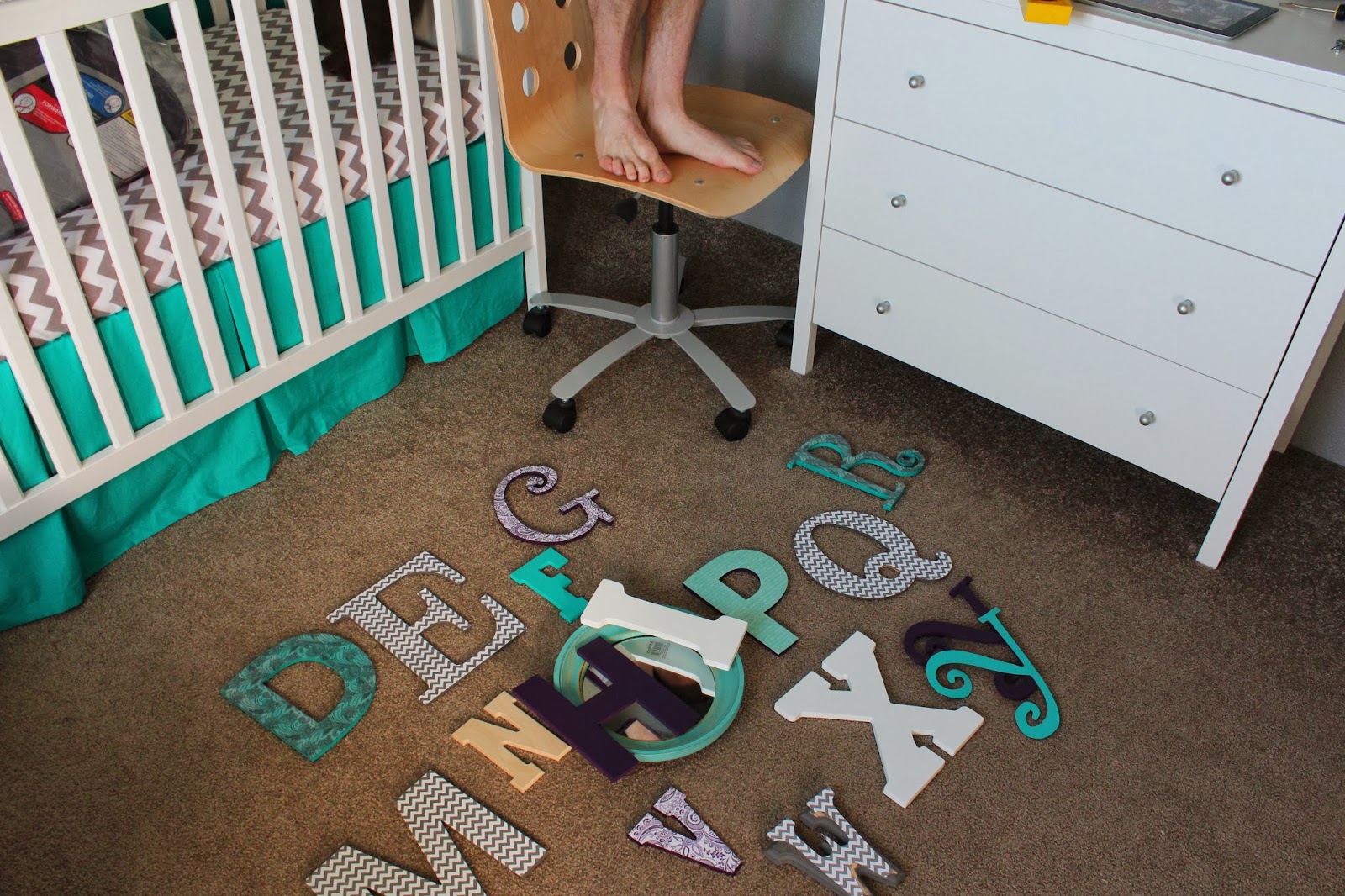
The letters are a mix between wood and sturdy chipboard. Each one (except for the "o" mirror) was painted and crafted by Andrew and myself.


The letters are a mix of paint, yarn, and scrapbook paper modge podged on the front.


 My favorite times in life have been when Andrew and I have worked together through every detail. I am one lucky girl to have a man that is as active in the process as I am. We planned it out, bought and built Ikea furniture, painted the room, sewed the textiles, created the letters, and added our love of children's books where ever we could. We are in love with our teal, gray, white, and purple nursery and just hope Baby Long loves it even more.


Oh, and they "helped" too...


Wednesday, July 3, 2013

ipads: shifting from one to ten

Today I am a busy teacher. Actually I feel like I have been an overly busy teacher since October (hence the hiatus in postings). But, I have been enjoying my busy life. One thing that added hustle and bustle to my classroom was the gift of nine iPads! I'm not too sure who was more excited, my students or myself... However this shift from sharing my one iPad under the document camera to nine iPads, a teacher iPad, and an apple TV created the need for me to seriously think about how this whole system was going to work and function in my room.

The first step I took was searching out other teacher blogs that have created rules and a visual representation of those rules to get an idea of what guidelines I would need in kindergarten. A lot of rules and permission slips were geared towards the upper grades, but a lot of those ideas still applied. I thought that I would have to compile my own rules page and switch into my graphic designer mode until I found this: Heidi Songs Ipad Tips.

created by Heidi Songs
I have used Heidi Songs in my classroom the last two years and my students love learning with the DVDs, so you can tell how pumped I was when I found a connection to iPads through her site as well. The image is wonderful and sums up the basic rules I wanted in my room. The visual is fantastic for my little ones. Of course we had lessons and discussions on the rules before the iPads were touched. I then posted the sign on the cupboard where the iPads are kept, making it right in their sight line everyday when pulling out and putting away their iPads.

Now that they had the rules, I had to work on which iPad would go to which student. I wanted to assign iPads so that certain games that required/ allowed name sign-ins would match the specific students (instead of student one or guest). Some of the apps I use grow with the students as they accomplish certain goals. I did not want a high student to go in and raise the difficulty for a lower student. I wanted it to be more individual. Also, if there was an issue with the iPad I had a limited number of students to address, verses the whole class. Obviously this would be much better if I had one iPad for one student, but we made it work within our center groups. I made the background screen image a giant number. And then wrote the number next to the student's name on their center group list. They knew that was their iPad and not to touch any other iPad without teacher permission. It worked wonderfully. No fighting over iPads and always being able to track who was on the iPad that day.

Sorry, kind of blurry... but you get the gist.
My last step before teaching some basics of how to use them and the apps they would like was to kid-proof the iPads. By this, I went into settings and controlled the content and accessibility of the iPad. In settings> general> restrictions you can prevent students from accessing everything on the iPad. For example my young non-readers see a pop up in a game talking about "in app purchases" and they are to click yes or no. Frequently those fingers just click boxes until the game they are playing reappears. This could get costly on my personal credit card if all 100 apps on all 9 iPads started charging me a dollar or more. I have things like the internet, inappropriate content, camera, and in app purchases restricted on mine. You can also restrict things such as volume limit, deleting apps, and more. The best feature is that if you would like to alter these restrictions you would have to go back into settings and type in the passcode before given that option. I found out that it takes zero time for these sharp five and six year-olds to learn how to move apps around the screen, delete them by accident, and spend their learning time taking pictures of their group mates. I will possibly remove so many restrictions after some time and more teaching, but for the start this was wonderful to have it all locked down.

The last couple issues that we delt with when they appeared (and now I know what else to include for the next class) is communicating when iPads were about to die and have zero battery left so I could charge them in time, communicating any technical issues like apps not responding, and how to control the brightness and volume. I wanted the battery life to last and their eyes not to burn, and one of my kiddos learned how to adjust this by double clicking, so we had to talk about what level of brightness is okay and how to fix it if someone has messed with the brightness; along with loud and quiet volumes.

I also kept the iPads in a locked cupboard so they were safe and only accessible when I wanted them to be.

 If you think you are going to include iPads in your classroom environment or you are not sure about this I have three big BIG pieces of advice: 1. DO IT! iPads have added a lot of success in my classrooms. 2. Explore and know the piece of technology and the apps you place on it. Be one step ahead of those smart brains in your classroom. 3. Everything in moderation. We might use iPads frequently and I am constantly expanding their use, but I am still an advocate of play-dough, real books, and everything children need to experience in real 3D life.  


Sunday, October 21, 2012

pinterest inspired

Today I am a procrastinating diy adventurer. I have my prep working sitting in nice organized piles. "Grade me!" "Color and cut me out to make puppets!" "Tear my pages out." I hear my work yelling to get moving. My husband has so much motivation he has cleaned and organized both the kitchen and our office, plus completed his school work for the weekend. And what have I accomplished today? Nice guess, no not my prep work... my art projects I have been neglecting since the summer! Yay!

Now with those accomplished I am moving on to my next task. Nice guess again, no not my prep work... sharing my creative diy adventure with you!

My first project is another art piece for our guest room. It has a purple and green color scheme and already is the home space for my paint chip dream sign (blogged here). Now I have added a new canvas sign.

be spontaneous, care deeply, create happiness, give love, enjoy the little things
The inspiration came from a few different pieces I had seen on Pinterest. I took a blank canvas and covered it with a thousand shades of my colors in a random pattern. I than stuck the stickers down for my favorite saying. Next, I tried to create the words with both white glue and hot glue, but with no luck I turned to puffy paints. I had success there and could move on to painting everything black. Once the paint dried I peeled off the stickers and ta-da! I thought about doing all the words with stickers, but my husband liked the more modern feeling of a unified color scheme and I liked using my own fonts verses choosing a sticker set.

Second project was yarn covered letters. A very LONG time ago I saw this idea from an old friend (You need to check out her blog! happy.shiny.day. Do it!). I just fell in love with the letters and set out to do it myself.


We hunted down letters all over the state of California and finally agreed upon the most impossible to cover letters. Thanks hunny. Easily picked out our yarn, and a few months later I had one letter done. This weekend I finally finished our initials to create this piece. We are still working on compromising about a frame, and by compromise I mean convince him my choice is the correct choice. Currently he enjoys his pencil frame you can see in the picture.

Third and final project of the weekend is our love letter box. I found the idea on Pinterest to write each other a letter on your anniversary each year and place it in the box without reading the other persons letter. We are going to open and read the letters on a milestone anniversary, like our 25th.


I found a small sweet box and designed it to match our wedding stationary and our custom throw pillows. I burned the design into the box first and than covered with a gray paint to match our gray and white room. I am excited to have these keepsakes as we continue in our love story.

I hope you find something that inspires you so much you push your to-do list aside and have your own creative diy adventure day. Off to procrastinate some more!


Sunday, September 9, 2012

it's going to be an APPealing year

Today I am a scavenger for great classroom apps. I started my stock pile last spring and it seems to be growing every moment. However, my critics on keeping an app are tough- any app has to be approved by my five, six, and seven year olds. If it does not make them yell out for more than it gets deleted quicker than it was downloaded.

*Note: This is a rough draft with no time frame of a final being released. The plan is to update this when I find new apps and to continue filling in personal summaries to help further explain each app.*

First Grade:


- Phonics Genius (Innovative Mobile Apps): This app is home to word families and OCD organization. With customization you can highlight word chunks, turn auto-reading off, and record your students sounding out and reading the word. I love to do the SIPPS format of "sound it, sound it, read it."

- Count Money- Coin Matching Game for kids (GrasshopperApps.com): Great customization to help keep the game at a "just right level." Students play a matching game to match amounts to coins, or different coin representations showing the same amount. They have also created a new app called little reader that has sparked my interest...

- First Grade Smart Kids (Suma Solutions Inc.): This is built for the iPhone, but can be enlarged to use on the iPad. It deals with topics of Math, English, Social Studies, and Science. Pick a subject, category, and boom multiple choice review questions appear.

- Tic Tac Toe: This is a Lakeshore learning app that requires students to answer a phonics question before placing their symbol. My class could play round after round if I let them.

- Planets (Q Continuum): Great to explore, zoom in, and learn about our solar system. My favorite highlight is to see real time earth as part is under the darkness of night.

- Hungry Fish (Motion Math): Not only are my kids addicted to this, everyone I come across is addicted to feeding math facts to this fish. It is so fun and challenging that you forget you are building fact knowledge! A must get!!!

- Adventures Undersea Math Addition (Brain Counts): Another fun fish game perfect for addition skills. Work to uncover the hidden sea picture.

Dinosaurs: (One of my favorite themes)


- Dinosaurs Unleashed Free! (Lucidifi): Great flashcards for a wide variety of dinosaurs (less childlike images when compared to Dinosaurs: An Early Introduction). You gain all sorts of facts such as weight, height, diet, when and where they lived, etc. You can also test your knowledge with a quiz offered in the app.

- Discovering Dinosaurs (Laughing Technology): Leveled reader that discusses discovering dinosaurs. Interactive with vocabulary to hear harder words sounded out, clear photographs, and finishes with questions to spark class conversation.

-Dinosaurs HD (PicPocket Books): Funky book that mixes computer images with photographs. Nice introduction to dinosaurs without overloading little brains with extra information.

-Dino Kids (Template Magician): Memory match with cartoon dinosaurs

- Dinosaurs HD (Rye Studio Science): More geographical based. Instead of shuffling through dinosaur flashcards, you first select a location off the map, then select a dinosaur, and finally listen to information about it. Honestly, I did not find myself using this app with students yet as I am still trying to figure out if I like it. I kept it on the list for the time being though.

- Dinosaurs Magic School Bus: While either reading or listening to this story be read to you, students gain information about so many different dinosaurs and the eras they lived in. The best part? You get to play paleontologist and dig for fossils, then place them to form a dinosaur. My students learned how to ID bones, built academic language, and knocked the socks of adults with their knowledge!

-Dinosaurs An Early Introduction (Curious Circus): You get to hear dinosaurs, see their skeletons, and hear their names. Best app to spark interest and start the unit with.

-Dino Park Math (Millenium Multimedia): Have fun exploring the dinosaur park while building up your math skills. Cute illustrations, with a nice reward system as you collect and build dinosaurs.

Kindergarten:


-National Geographic Explorer: This was last updated in March when I downloaded it. Basically it is based off their magazine, however no subscription is necessary as far as I can tell. Topics included are snakes, weather, and lemurs, as well as others. Great images and nice information.

-Educreations: Mobile whiteboard: Best white board app I have come across. Different color ink, add images, and record your whole lesson for easy play back.

-Little Fox (Shapes Minds and Moving Images GmbH): great music app that has a lot of fun surprises to find as students learn about the touch screen abilities of an iPad.

-BrainPop Jr.:

-Preschool and Kindergarten Learning Games (Kevin Bradford): Free topics are shapes, colors, and letters. You can make a purchase for more subjects. Asks simple questions and students choose the correct answer. Cute little owl dances when correct. Straight forward simple app, easy for beginners to just pick up and play.

-Punky Dunk (FamLoop): Great interactive story that allows students to take pictures, draw, and play as they read.

-Where Do I Go? (Camigo Media LLC):Great sorting game to introduce grouping and categories.

-Wood Puzzler (Little Five Games): The name says it all- play with the alphabet, pictures, or build your own. Looks like a classic wood puzzle, but has a nice technology upgrade to it. Best part? No more lost puzzle pieces!

-Time Reading (Kinder): Times reading passages and provides results. I believe you can create a profile for each student and see how they did on each individual story. Love the clearly shown words per minute.

-The Cat in the Hat Lite (Oceanhouse Media): This is the best interactive story I have come across in a long time. Helps build vocabulary and confidence in beginning readers. Love it!

Math:


-Teaching Number Lines (Little Monkey Apps): Deals with sequencing, skip counting practice, and tests skip couting. Click the "jump forward" lily pad to do simple math problems using a number line and frog. You have to move the frog each step by dragging, which I love than just tap the numbers, makes it more interactive and meaningful.

-Math Bingo (ABCya.com): Pick out a fun character and what math operation you would like to do. It brings up problems and you find the solution on your board. Try to get bingo! Be careful it does time you and show how many incorrect which calculates into your score! As you win you collect these bugs which can be viewed and played with minimally- cute tiny reward.

-Mad Math (Lunchbox Apps): Nice flashcard app that really allows you to adjust what your student is practicing. Select the biggest number, problem type, number type, and the number of flashcards, all before starting your challenge. Warning: you do have to type in your answer on a calculator keyboard format; don't forget to hit enter!

-Math Chicken- Number Scale (Taptolearn): You are building a bridge for the chicken to cross by balancing the scale (the scale looks like a bridge). The goal topic is finding equivalents. The scale shows the number or numbers on one side and you add a weight to the equivalent. The top of the screen also shows the problem in math sentence form.

-Chicken Bounce (Tiny chicken learns math) (Taptolearn): This app moves quickly and I think gives the answers away. My students like it because you are given an addition problem (or other operation you choose) and than you must place a raft on the number line in the correct location. The chicken than bounces down to your raft answer and back up to the other side of the water.

-Motion Math Zoom (Motion Math):

-Kinder Add

-Comparative Adjectives (Grasshopper App):

-Visual Manipulatives (ABCya.com):

-Lobster Dive (Learning Games): This app is pretty advanced. I would recommend for third grade and up. It starts on a nice simple number line, but it quickly turns to negative numbers and such.

-10 Frame Fill (Classroom Focus): Great reusable 10 frame. Now I do not have to create one every lesson (because we all know I cannot seem to ever find the one I "just made".)

-Candy Count (Camigo Media LLC): count the candy as it fills up the jar.

-Lunch Box (part of the Monkey Math series; THUP Games):

-Monkey Math (THUP):

Alphabet:


-Magnetic ABC (Dot Next): Just like the name suggests- here is your digital magnetic letters.

-ABC Alphabet Phonics Touch (GrasshopperApp): Helps with letter name identification.

-My first puzzles The alphabet (Alexandre Minard): Complete a puzzle to build each letter of the alphabet

-Pocket Phonics (Apps in my Pocket): Hear the sound, draw the letter that makes the sound. Very picky app to help with precision.

-Letter of the Day: Another Lakeshore Learning app that helps focus on one letter with a song, pictures, and writing practice.

-MyABC lite Write and Learn (PlaySmart-Kids):

-Pre-K Letters and Numbers (Bright Start):

-Wee Sing (Zuuka Inc.): Great app that blends images with each letter name and sound. Each letter has an animal that plays a little song, and the letter is supported by three other images that start with the letter of focus. Lots of different ways to choose how to interact with the app.

Sight Words:


-Sight Words and Spelling (Marcel Widarto):

-Sight words Hangman (Marcel Widarto):

-Word Wall HD (Emantras Inc.)

Spelling:


-Simplex Spelling Phonics 1 (Pyxwise Software):

-Spelling Magic (1, 2, and 3) (Preschool University):

-Rocket Speller (Little big Thinkers): This app is hard for those of us that are not gifted with a rocket background. I had a couple students like it, but in all honesty I think this might be the next app deleted.

-Skill Builder Spelling (Ben Kaiser):

-Word Scramble PCS (DynaVox Mayer-Johnson): Try to build the word shown by the image.

Phonics: 


-Phonics Rhyming Bee (Abitalk):

-Build a Word- Easy Spelling with Phonics (@Reks):

-Zap Phonics

-Sound Sorting: Lakeshore Learning app that has you choose three sounds. It then shows you images of items that need to be placed under one of the three selected sounds.

If you have any great apps you are hiding out there please share them out, don't make us dig for treasure you already found! Also, if you have any questions I will do my best to answer them, but no promises.

Happy Hunting!


chicka chicka blank slate

Today I am a survivor of the first week of Kindergarten. We had a wonderful unpredicted turn out of too many kindergarteners, making the first day pretty interesting. Thankfully I have found a supportive team that has tried to combat the 54 and especially thanks to a flexible colleague, I am down to 28 (phew!). We celebrated the start of the school year with a wonderful theme of Chick Chicka Boom Boom, and so without further ado, welcome to our new room!
Coconut tree: puffed up to have a 3D feel.

Calendar wall: Theme section, math number line, months, days of the week, counting the days of school, tally the days in the month, Velcro pattern block, calendar, pocket chart for focus stories, pocket chart for jobs, and weather window visuals.

Library corner: dollar tree baskets and color coordinating zip ties, paint chip labels.
Supply Station


Activity corner: "Jobs" change monthly to grow with students. Currently I have blocks, beginner puzzles, magnetic alphabet, animal cards, lacing cards, etc.

To step back and gain an almost 360 degree view:

The word wall seems so empty, but we add to it throughout the year all together. (Teacher's corner-ish, word wall, rug area).

On the board I have found rocks that I have painted the ABCs and glued magnets on the back. (Library corner, book boxes, writing center).

The garland in the windows is punched paper that is sewn together. (Playhouse, activity corner, supply station). 

(Art center, rice table, to the right are the bathrooms).
Side note: This is a shot of the garland in process. Cute blues, purples, and greens.

I'm just so happy to be in a room this year that I could truly make my own. I am minimalistic, and very cautious to put up anything that does not serve immediate need. That being said, it does seem more bare than my usual room without student artwork. I cannot wait to get started so we can fill up our art wires and art gallery. I also have the chance this year to forgo having a teacher's desk. I like giving as much space to the students as necessary. I have a few filing cabinets and one bookshelf- what more could a girl need? As much fun as it was getting ready for the first few weeks I am already planning for my tree to change as the next set of themes appear!

By the way, we are calling the battle of the rooms a tie. All is fair in love and war.